
Run a Local Rollup and Sequencer
This guide will walk you through running a local Geth rollup against the Astria sequencer, using the astria-go cli to run the required components of the Astria stack locally on your machine.
Install the astria-go cli.
Setup an astria-geth Rollup
Clone and Build Astria Geth
astria-geth is a fork of go-ethereum modified to work with the Astria sequencing layer.
View the source code here.
Requires Go, just, make, Foundry, and jq:
Open a new terminal window and clone and build Geth:
git clone git@github.com:astriaorg/astria-geth.git
cd astria-geth
just -f dev/justfile build
./build/bin/geth versiongit clone https://github.com/astriaorg/astria-cli-go.git
cd astria-geth
just -f dev/justfile build
./build/bin/geth versionCLI Configuration of the Astria-Geth Genesis
Create an account with cast and export the address and private key to env vars.
eval $(cast w new --json | jq -r '@sh "export ADDRESS=\(.[:1][].address) PRIV_KEY=\(.[:1][].private_key)"')You will use the private key for your new account to send test transactions later on as the same env var.
Set a rollup name, chain id, and starting balance:
export CHAIN_ID=<some 6 digit number>
export ROLLUP_NAME="<your rollup name>"
export STARTING_BALANCE=300000000000000000000
Once all env vars are set you can print their values for confirmation:
echo $ADDRESS
echo $PRIV_KEY
echo $CHAIN_ID
echo $ROLLUP_NAME
echo $STARTING_BALANCE
Update the genesis file:
jq --arg chain_id "$CHAIN_ID" \
   --arg rollup_name "$ROLLUP_NAME" \
   --arg address "$ADDRESS" \
   --arg starting_balance "$STARTING_BALANCE" \
   '.config.chainId = ($chain_id|tonumber) |
    .config.astriaRollupName = $rollup_name |
    .alloc = {($address): { "balance": $starting_balance }}' \
    ./dev/geth-genesis-local.json > temp.json && mv temp.json ./dev/geth-genesis-local.json
Manually Update Astria-Geth Genesis
TIP
You can skip this section if you have updated the genesis file using the commands in the previous section.
Create a new genesis account for your Geth rollup:
cast w newOpen the dev/geth-genesis-local.json file in the astria-geth repo and update the "alloc" account with the new address you just created, as well as updating the "chainId" and "astriaRollupName" to something of your choosing:
{
    "config": {
        ...
        "chainId": <6 digit number>,
        "astriaRollupName": "<your rollup name>",
        ...
        "alloc": {
            "<your new address>": { "balance": "300000000000000000000" }
        }
    }
}
You will use the private key for your new account to send test transactions later on.
Start Geth
In your Geth terminal window, run the following to initialize and run the Geth rollup:
just -f dev/justfile init
just -f dev/justfile run
If you need to restart the rollup, you can stop the program with Ctrl+C and restart with:
just -f dev/justfile runIf you need to restart the rollup and want to also clear the state data, you can use:
just -f dev/justfile clean-restartConfigure the Local Astria Sequencer
With Astria-Geth running, open a new terminal window to configure the local sequencer.
CLI Configuration of the Astria Sequencer
Initialize a new instance with the astria-go cli:
astria-go dev initExport the rollup name. This must be the same as the rollup name you used when configuring the Astria-Geth genesis.
export ROLLUP_NAME="<your rollup name>"Update the rollup name for your sequencer instance:
astria-go dev setconfig rollupname $ROLLUP_NAMEManually Configure the Sequencer
TIP
You can skip this section if you have initialized and updated the sequencer config using the commands in the previous section.
astria-go dev initNavigate to the ~/.astria directory. If you have run the commands shown above, you should find a default directory.
Open the ~/.astria/default/networks-config.toml file and update the rollup_name variable in the [local] sections using the same "astriaRollupName" you used when setting up your astria-geth rollup.
[networks.local]
sequencer_chain_id = 'sequencer-test-chain-0'
sequencer_grpc = 'http://127.0.0.1:8080'
sequencer_rpc = 'http://127.0.0.1:26657'
rollup_name = '<your rollup name>'
default_denom = 'ntia'
Open the ~/.astria/default/config/base-config.toml and update the "astria_composer_rollups" value to have your rollup name:
astria_composer_rollups = '<your rollup name>::ws://127.0.0.1:8546'TIP
You can perform the above steps using the following commands. NEW_NAME should match the "astriaRollupName" in your dev/geth-genesis-local.json:
export NEW_NAME="my-new-chain"
export INSTANCE="default"
cd ~/.astria/$INSTANCE/
sed -i '' '/\[networks\.local\]/,/^$/ s/rollup_name = .*/rollup_name = "'"$NEW_NAME"'"/' \
    ./networks-config.toml
sed -i '' \
    's/\(astria_composer_rollups = '"'"'\)[^:]*::/\1'"$NEW_NAME"'::/g' \
    ./config/base-config.toml
Start the Sequencer
Use the cli to run a local Astria Sequencer.
astria-go dev run --network localTIP
When running an Astria sequencer using the cli, the --network local setting is the default. astria-go dev run is effectively an alias for astria-go dev run --network local.
When running the Astria stack locally, you will see a TUI that displays the logs of the Astria Sequencer, the underlying Cometbft node, the Astria Conductor, and Astria Composer: 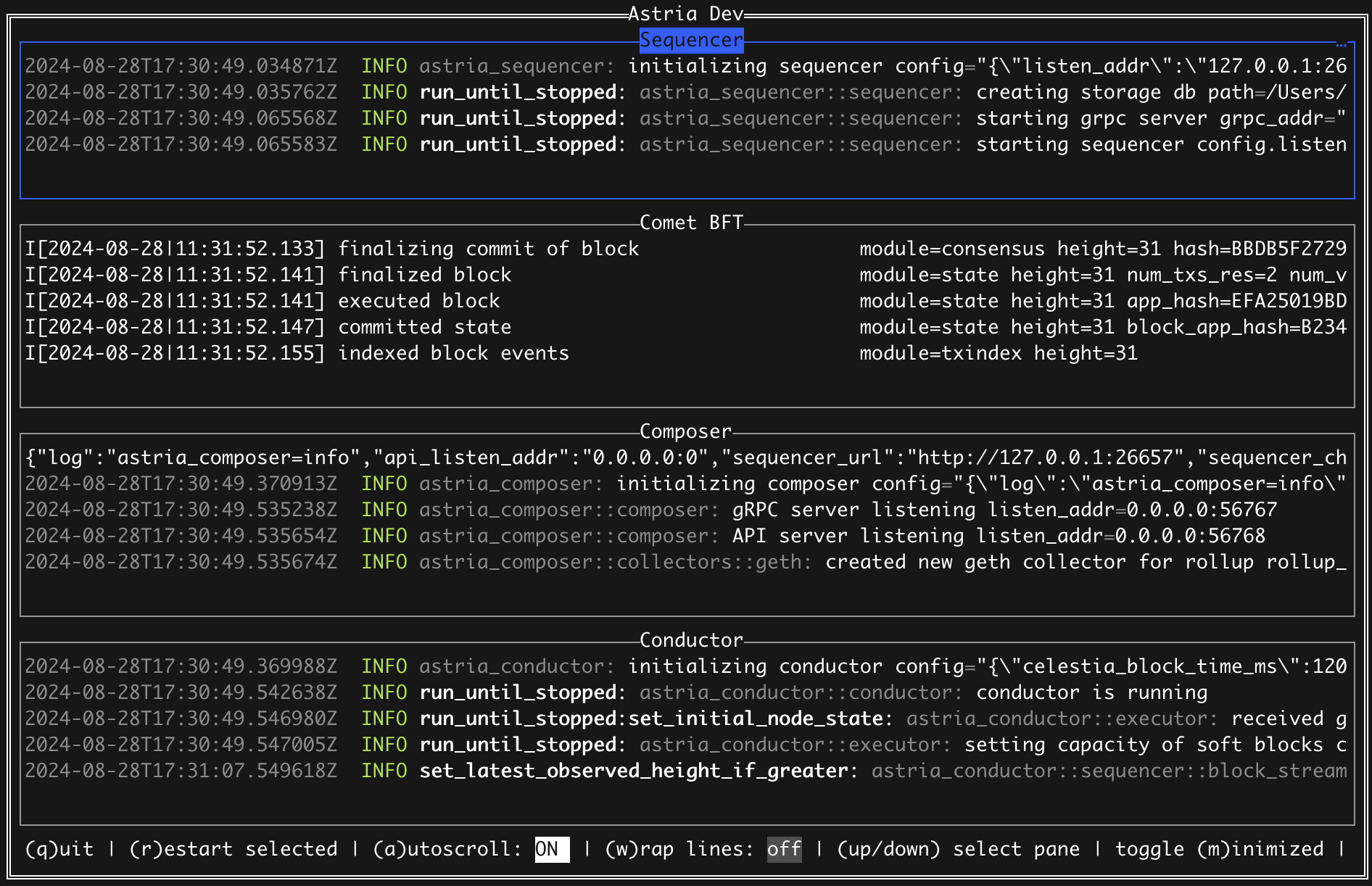
Test your Rollup
To test that your rollup and the sequencer are configured and running correctly, you can follow the Test Transactions instructions here.